Portfolio Organization
Best practices for organizing trades across multiple portfolios — by account, asset class, strategy type, or capital allocation.
How to use portfolios to structure your trading across accounts, asset classes, and strategies -- and why it matters for tracking performance.
1. What is a Portfolio in Tradris?
A portfolio is a container that groups your trades, strategies, risk settings, and journal entries together under one roof. Think of it as a separate workspace for a distinct segment of your trading.
Every portfolio in Tradris is self-contained. It has its own:
- Trade list -- only the trades you assign to that portfolio
- Journal timeline -- entries scoped to that portfolio's trades
- Strategies -- the specific strategies you use within that portfolio
- Risk management settings -- capital, risk per trade, max open trades
- Performance metrics -- win rate, average R, P&L, all calculated independently
- TradrisAI insights -- behavioral analysis scoped to that portfolio's data
When you create your Tradris account, a default portfolio is created for you automatically. You can rename it, but you cannot delete it. All trades you log will go into this default portfolio unless you choose otherwise.
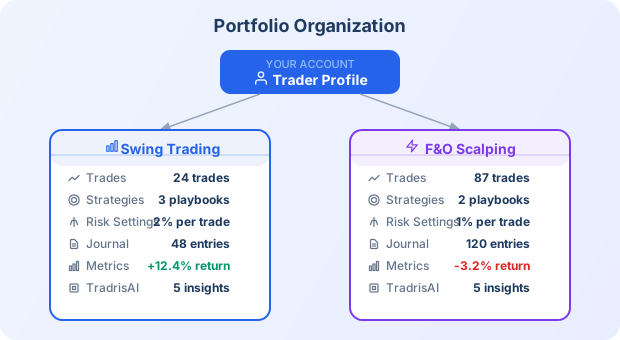
Each portfolio is a complete, independent view of one slice of your trading.
2. When to Create Multiple Portfolios
You do not need multiple portfolios on day one. Many traders do well with a single portfolio for months. But as your trading grows, you will hit a point where lumping everything together makes the data noisy and the metrics misleading.
Here are the most common reasons to split into multiple portfolios:
By broker account
If you trade through Zerodha and Angel One, create a portfolio for each. This keeps capital tracking accurate -- your risk-per-trade percentage is based on the capital in that specific account, not your total capital across brokers.
By asset class
Equities, futures, and options behave differently. Mixing them in one portfolio means your win rate, average R, and P&L blend together in ways that hide what is actually working. Separate portfolios let you see that your equity swing trades are profitable while your options trades are bleeding capital.
By strategy type
A swing trader who also takes intraday setups is running two fundamentally different approaches. Intraday trades have different risk parameters, different holding periods, and different psychological pressures. Separate portfolios give each approach its own metrics and its own TradrisAI insights.
By capital allocation
Some traders run a main account alongside a smaller experimental account where they test new setups with limited capital. Keeping these in separate portfolios prevents experimental losses from distorting your main performance metrics.
By market or timeframe
If you trade both Indian equities and US markets, or both daily charts and 15-minute charts, portfolios help you track each independently.
3. Portfolio Settings
When you navigate to a portfolio's settings page, you will find controls that apply only to that portfolio. Nothing you change here affects your other portfolios.
Risk management settings
Each portfolio has its own risk configuration:
- Total capital -- the amount of capital allocated to this portfolio
- Risk per trade -- the maximum percentage of capital you are willing to risk on a single trade (e.g., 1% or 2%)
- Maximum open trades -- the cap on how many positions you can hold simultaneously in this portfolio
These settings drive the risk validation warnings you see when entering trades. If you set a 1% risk limit on your swing portfolio and a 0.5% limit on your intraday portfolio, Tradris enforces each independently.
Strategies
Strategies are portfolio-scoped. When you define a strategy like "Breakout Pullback" in your equities portfolio, it only appears as an option when logging trades in that portfolio. This keeps your strategy dropdown clean and relevant.
You can have the same strategy name in multiple portfolios if the approach applies to both. They are tracked independently.
Performance metrics
Tradris calculates the following metrics per portfolio:
- Trade count -- total trades logged in this portfolio
- Win rate -- percentage of closed trades that were profitable
- Average R -- average risk-reward ratio across closed trades
- Total P&L -- realized profit and loss
- Journal entry count -- how many journal entries exist in this portfolio
These numbers are never blended with other portfolios. When you look at a portfolio's metrics, you see only the performance of the trades inside it.
Journal timeline
The journal page filters to your currently selected portfolio. Each portfolio has its own timeline of trade entries, general reflections, emotional check-ins, lessons, and analysis notes. Switching portfolios switches the journal view.
TradrisAI insights
TradrisAI analyzes your trading behavior per portfolio. Insights like "most profitable strategy," "discipline vs. performance correlation," and "early exit detection" are all scoped to the trades in the selected portfolio. This means the AI feedback you receive is specific and actionable for that particular trading approach.
4. Portfolio Sharing and Mentorship
Tradris supports sharing individual portfolios with a mentor for accountability and feedback. This is portfolio-level sharing, not account-level -- you choose exactly which portfolios a mentor can see.
How sharing works
- Go to the settings page of the portfolio you want to share.
- Use the sharing section to invite a mentor by email.
- The mentor receives access to view that portfolio's trades, journal entries, metrics, and strategies.
Granular permissions
When you share a portfolio, the mentor gets read-only access. They can see your trades, read your journal, and review your metrics, but they cannot modify anything -- no editing trades, no changing risk settings, no deleting entries.
This gives you accountability (your mentor can see whether you are following your rules) without giving up control of your data.
Portfolio-level, not account-level
You might share your main equities portfolio with a mentor while keeping your experimental options portfolio private. Each portfolio's sharing settings are independent. You decide what your mentor sees.
5. Best Practices
Start with one portfolio
Do not create five portfolios on your first day. Start with the default portfolio, log your trades, build the journaling habit, and let Tradris accumulate enough data to generate meaningful insights. You need a baseline before segmentation adds value.
Add portfolios when the data demands it
The right time to create a second portfolio is when you notice that lumping two different trading approaches together is making your metrics unreliable. If your win rate of 55% is hiding the fact that your swing trades win 70% of the time while your intraday trades win 30%, that is the signal to split.
Do not over-segment
Every portfolio needs enough trades for the metrics to be statistically meaningful. If you create a portfolio for every minor variation of your approach and each one has only 8 trades, the win rates and average R values will be unreliable. A portfolio with 30+ trades gives you much more trustworthy data than five portfolios with 6 trades each.
Use portfolios for genuinely different approaches
A portfolio should represent a meaningfully different way you trade -- different capital, different risk rules, different instruments, or a different strategy family. Do not create separate portfolios for what are really just variations of the same approach. Those are better handled as different strategies within a single portfolio.
Review portfolio metrics independently
One of the biggest benefits of multiple portfolios is the ability to compare them. Check each portfolio's metrics regularly and ask: which approach is actually making money? Which one has the better risk-adjusted returns? Are you more disciplined in one portfolio than another? Let the data guide where you allocate more capital and attention.
Name portfolios clearly
Use names that immediately tell you what the portfolio contains. "Zerodha Swing" is better than "Portfolio 2." If you share a portfolio with a mentor, a clear name helps them understand what they are looking at.
Quick Reference
| Action | Where to find it |
|---|---|
| Create a new portfolio | Portfolio manager (settings area) |
| Switch active portfolio | Portfolio selector in the app header |
| Configure risk settings | Portfolio > Settings > Risk Management |
| Add strategies | Portfolio > Strategies |
| View portfolio metrics | Portfolio dashboard or journal page |
| Share with a mentor | Portfolio > Settings > Sharing |
| Delete a portfolio | Portfolio manager (only if empty; default cannot be deleted) |
Summary
Portfolios are the organizational backbone of Tradris. They keep your trades, strategies, risk settings, and insights cleanly separated so you can see what is working and what is not -- without noise from unrelated trades muddying the picture. Start simple, add structure as you grow, and let the per-portfolio metrics guide your decisions.
Ready to trade with discipline?
Start building your framework today. It takes 2 minutes to log your first trade.