Tradris Prompts — When and Why We Nudge You
Every place Tradris prompts you to journal — contextual in-app prompts, email nudges, and onboarding. Learn why we nudge at specific trading moments.
Tradris is built on a simple observation: traders already know they should journal. The problem is never knowledge -- it is timing. A prompt that arrives two hours after an emotional exit is too late. A prompt that appears the instant you change your stop-loss catches the thought while it still matters.
This document maps every place Tradris prompts you to write, explains the trigger behind each one, and shows how they connect to your discipline score.
1. Contextual In-App Prompts
These are the core of the Tradris journaling system. They appear as a floating banner in the bottom-right corner of the screen, timed to the exact trading action that just happened. On mobile, the banner spans the full width of the viewport.
Each banner contains:
- A prompt message specific to what you just did
- A quick-save textarea so you can capture a thought in seconds
- A "Full journal" button if you want to write a longer, structured entry
- A "Skip" button to dismiss immediately
- A +10 discipline points indicator on the Save button
The banner auto-dismisses after 15 seconds if you do not interact with it. The moment you tap or click into the textarea, the auto-dismiss timer pauses so you can write without pressure.
Trigger Reference
| Trigger | When It Fires | Prompt Message | Helper Text |
|---|---|---|---|
| Plan Change | You edit the target price, stop-loss price, or expected days on an existing trade | "Why are you changing your plan?" | "Changing a plan isn't wrong. Understanding why is what matters." |
| Position Entry | You add an entry position to a trade in the Entry stage | "Did you execute this trade as planned?" | "Be honest -- this helps separate good ideas from bad execution." |
| Position Exit | You add an exit position to a trade in the Exit stage | "Regardless of the result, how did you trade?" | "This is about process -- not profit or loss." |
| Review Arrival | A trade reaches the Review lifecycle stage | "Before you classify this trade, capture your thoughts." | "What would you tell a fellow trader about this trade?" |
How It Works Under the Hood
When you save a trade form, Tradris evaluates what changed. If the save involved a plan change, a new entry position, or a new exit position, the contextual prompt fires after the save completes. For the Review Arrival trigger, the prompt fires automatically when the trade form loads at the Review stage (with a short delay so the page renders first).
The prompt creates a journal entry linked to the specific trade. For plan changes specifically, the journal entry is also linked to the plan-change history record, so you can later see exactly which version of your plan you were reflecting on.
If multiple triggers apply to the same save (for example, you changed your stop-loss AND added a position), only the highest-priority trigger fires. Priority order: Plan Change > Position Entry > Position Exit.
What Gets Saved
- Quick save: Creates a journal entry of type
GENERAL(orPLAN_CHANGEfor target/SL edits), linked to the trade. Tagged with "Change of Plans" for plan changes. - Full journal: Opens the full journal creation modal, pre-linked to the trade. You get the same +10 discipline points.
- Skip: No journal entry is created. No penalty. The prompt will not re-appear for the same action.
2. Email Nudges
Email nudges operate on a completely different timescale. They are not about capturing a moment -- they are about maintaining the habit when you drift away from the platform.
Nudge Reference
| Nudge | Trigger Condition | Schedule | Subject / Message |
|---|---|---|---|
| Missing Journal | You have an active trade with no journal entry in the last 24 hours (trade must be at least 4 hours old) | Daily at 9 AM UTC | "Time to update your trade journal!" -- Reminds you that active trades deserve ongoing reflection |
| Re-engagement | You have been dormant for 7+ days with no activity | Manual send | "Review your trades, journal your learnings..." -- A nudge to come back and close open loops |
| Post-payment | You just subscribed to Tradris Pro | Sent once after subscription | A Pro tip encouraging you to write your first journal entry as a paying user |
Guardrails
Email nudges respect several boundaries so they never become spam:
- Quiet hours: No emails between 10 PM and 8 AM (based on your local time setting). The default quiet window is 22:00 to 08:00.
- Daily cap: Maximum 1 nudge email per day, regardless of how many active trades you have.
- Cooldown: The Missing Journal nudge has a 24-hour cooldown -- even if you have multiple trades without journals, you get one email, not one per trade.
- Frequency preference: You can set your nudge frequency to low, medium, or high in your notification preferences. Low reduces frequency by 50%; high increases it by 50%.
- Global off switch: You can disable all email nudges entirely in your notification preferences. Individual nudge types can also be toggled independently.
Infrastructure
The Missing Journal nudge runs as a Vercel cron job that hits the
/api/cron/nudges endpoint daily at 9 AM UTC. It queries for all active
trades missing recent journal entries, groups them by user, checks each
user's preferences, and sends via Resend.
Re-engagement emails are triggered manually (not automated) and target users who have been inactive for 7+ days.
3. Onboarding Prompts
These prompts appear only once, during your first session, and are designed to establish the journaling habit from the very beginning.
Discipline Journey Modal
When: First login, before you have completed any onboarding steps.
The modal introduces the discipline journey concept: Tradris tracks your discipline through points and levels, and every journal entry contributes. It sets the expectation that this is not just a trade tracker -- it is a framework for building trader discipline.
The modal auto-dismisses if you have already completed any onboarding step, and it uses session storage so it only appears once per browser session even if you navigate away and come back.
Onboarding Checklist
The onboarding flow has four steps, completed in any order:
| Step | Action | Discipline Points |
|---|---|---|
| 1 | Set your risk limits | +25 |
| 2 | Add a trading strategy | +25 |
| 3 | Add your first trade | +25 |
| 4 | Write a journal entry | +25 |
Step 4 is the journaling prompt. It awards +25 discipline points (compared to the standard +10 for regular journal entries), making it the single highest-value journal action available. Completing all four steps earns 100 discipline points total, which is enough to reach Level 2: "Framework Ready."
The onboarding checklist appears as a progress card on the main app page and persists until all four steps are complete.
4. Always-Available Entry Points
Not every journal entry needs a trigger. Tradris provides several places where you can write unprompted, at any time.
Navigation Header Button
Every authenticated page in the app includes an "Add Journal" button in the navigation header. This opens the full journal creation modal, not linked to any specific trade (though you can link trades manually from within the modal). Available on every page -- trade list, journal, strategies, risk management, settings, insights.
Empty Trade Activity Link
When you view a trade that has no journal entries yet, the activity section displays a "+ Add Journal Entry" link. This opens the journal modal pre-linked to that trade, reducing the friction of associating your reflection with the right context.
Journal Page Main CTA
The journal page itself has a primary call-to-action button for creating new entries. This is the natural home for standalone reflections that are not tied to a specific trade action -- market observations, strategy reviews, general lessons learned.
5. The Philosophy Behind Prompts
Tradris does not prompt you to journal because journaling is inherently virtuous. It prompts you because specific moments in your trading carry outsized importance for your development as a disciplined trader, and those moments are easy to skip.
Plan changes are the silent discipline killer
When you move a stop-loss or change a target, you are rewriting the rules of a trade that is already live. Most traders do this reflexively -- the price gets close to their stop, they feel the loss coming, and they widen it. Or a trade runs in their favor and they move the target higher out of greed.
The "Why are you changing your plan?" prompt does not judge the change. Some plan changes are legitimate (new information, changed market conditions). The prompt exists because the act of writing down "why" forces you to be honest about whether this is a rational adjustment or an emotional reaction. Over time, these entries become the most valuable data in your journal -- they reveal patterns you cannot see in P&L alone.
Entry and exit moments carry the highest emotional load
The moment you put real money at risk (entry) and the moment you realize a gain or loss (exit) are when emotions run highest. Fear, greed, relief, regret -- they all spike at these transitions. Journaling at these moments creates a forced pause. Even a single sentence ("I feel nervous about this position size") recorded in real time is more useful than a paragraph of post-hoc rationalization written the next day.
The entry prompt -- "Did you execute this trade as planned?" -- specifically targets execution quality. Did you enter at the price you planned? Did you take the position size your risk rules prescribed? The exit prompt shifts focus to process: regardless of whether you made money, did you follow your framework?
Review stage forces reflection before closure
The Review stage is the final checkpoint before a trade is classified and archived. The prompt "Before you classify this trade, capture your thoughts" prevents the common pattern of closing out trades mechanically without extracting any learning. It is the difference between a trade that happened and a trade you learned from.
The 15-second auto-dismiss respects your flow
Every contextual prompt auto-dismisses after 15 seconds of inactivity. This is a deliberate design choice. Tradris will never block your trading workflow or force you to journal. The prompt appears, offers the opportunity, and gets out of the way. If you start typing, the timer pauses -- but the initiative to engage always stays with you.
The discipline points system (+10 per entry) rewards consistency over compliance. There is no penalty for skipping a prompt. The incentive is purely additive: journal more, earn more points, level up, unlock insights that require a minimum data threshold.
How It All Connects
The following diagram shows how a single trading action flows through the prompt system into discipline points and, eventually, into actionable insights.
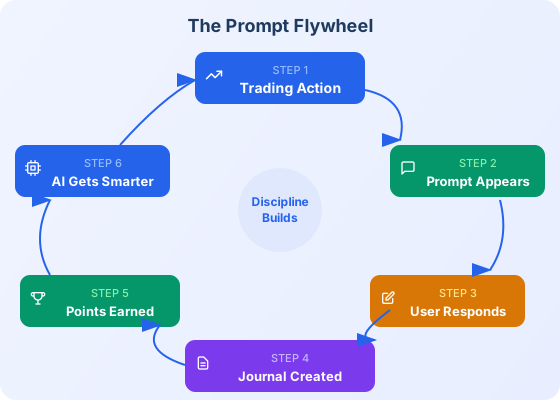
Each saved entry earns +10 discipline points, driving level progression and unlocking TradrisAI insights. The loop closes when insights from your journal data feed back into better trading decisions.
Summary of All Prompt Triggers
| # | Prompt | Type | When | Points | Can Disable? |
|---|---|---|---|---|---|
| 1 | Plan Change | In-app contextual | Edit target/SL/days | +10 | Skip per occurrence |
| 2 | Position Entry | In-app contextual | Add entry position | +10 | Skip per occurrence |
| 3 | Position Exit | In-app contextual | Add exit position | +10 | Skip per occurrence |
| 4 | Review Arrival | In-app contextual | Trade reaches Review | +10 | Skip per occurrence |
| 5 | Missing Journal | Email nudge | No journal in 24h+ | -- | Preferences toggle |
| 6 | Re-engagement | Email nudge | 7+ days dormant | -- | Preferences toggle |
| 7 | Post-payment | Email nudge | After subscription | -- | One-time only |
| 8 | Discipline Journey | Onboarding modal | First login | -- | Auto-dismisses |
| 9 | Onboarding Step 4 | Onboarding checklist | First journal entry | +25 | Completes once |
| 10 | Nav Header Button | Always available | Any page | +10 | Always visible |
| 11 | Empty Activity Link | Always available | Trade with no journals | +10 | Always visible |
| 12 | Journal Page CTA | Always available | Journal page | +10 | Always visible |
Twelve touch points. Each one placed at a moment where a single sentence of honest reflection can change the trajectory of a trade -- or a trading career.
Ready to trade with discipline?
Start building your framework today. It takes 2 minutes to log your first trade.